Wednesday, 22 October 2014

Download Services


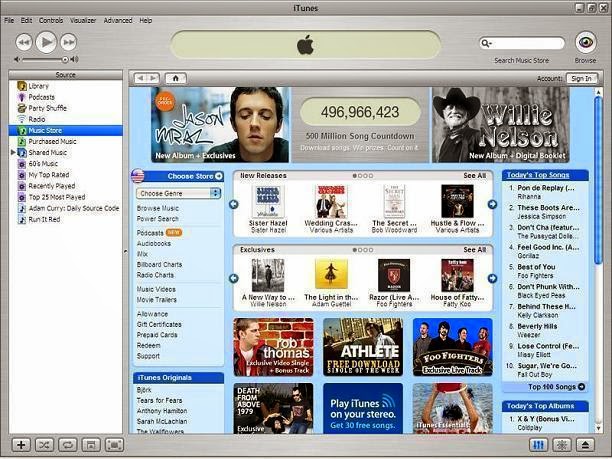
Download services are now an extremely common use of Online Services, instead of having to commute to a shop to buy your DVD or music CD you are now able to use software like iTunes which allow you to download music and movies wherever you are providing you have an internet connection. This allows you to watch the movies or listen to the music wherever you are and when you want to after they are downloaded. Many people now do not even record TV shows they have missed before but download them onto their tablets and watch them on their commute to work or in their free time. The use of downloading software has made the online services more accessible and widely used.

Advances in Technology
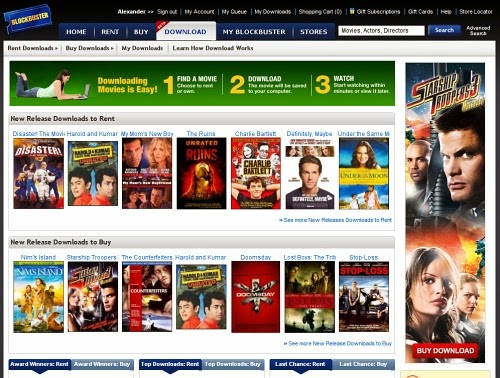
Download services have been made possible due to the advance in technology with broadband you are now able to download things and keep them, they are not temporary downloads and stay on your device after you have downloaded them. No longer do we have to go to the shop to buy books, games, music or even DVD’s but we can just download them at home and access them whenever we want.
Software has also become increasingly downloadable, you are now able to download things like Microsoft Word online instead of having to buy the disc in a store and download the software off of the disc. You can also do the same with things like protection software such as Norton which allow you to buy the software over the internet and download it within minutes and use it instantly.
SAT-NAV have also progressed with download services as the maps are updated using software, for example when they are building new roads or there have be
en new speed cameras have been put into place you just plug your SAT-NAV into your computer and the updates will automatically  start downloading. They can often take some time as if you have an international SAT-NAV they update all the road services in the region you acquire. For example before we travel to France each year we have to update the maps in France as they are quite often updating road systems etc.

Another example in the advance of technology is the idea that you are now able to download a book onto your device without having the physical book. This great discovery has made reading a book more of an accessible thing to do, Amazon made the Kindle where you could directly download books from their online website and they would instantly pop up in your library. So instead of buying a book you are buying a downloadable book that takes up no room and is easily kept or deleted.

Furthermore advances in downloadable software have now meant that we can download games that we are able to use wherever we are. We do not need a console or disc to play the games but can simply use our phones, tablets or PC’s. The games are downloaded via App stores or websites like Steam. These websites allow you to buy games and download them instantly or download games for free; they are accessible at any time and have produced a great market for a new way of making profit in gaming by making the Apps. The games are also updated on regular basis and they quite often do it automatically, so when a new education to the game comes out you do not need a new disc, it just downloads providing you have an internet connection. 


Automatic Downloads

Download services also have a mind of their own, such as with Windows, they detect when you are closing down your computer and begin to automatically update the software that is already on your device. This makes them extremely efficient pieces of software as you do not have to control them but they do everything themselves. Adobe is another type of software that updates itself is Adobe who behind the scenes of your computer downloads things that you may not want. It is also sometimes very difficult to find the field that Adobe has downloaded so for some software that has a mind of its own is a worrying advance in technology.
Another example is when iTunes automatically downloaded the U2 album onto users of the Apple products devices; however this was only if their devices were directly synced to their iTunes account. Many became angry with the Apple Company and felt rather violated that they could access their accounts and download software on their devices without having any control. 

How have download services affected us?
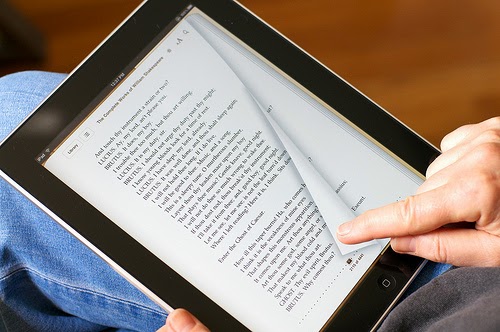

Download services have affected many things, firstly when you go to buy a new laptop or tablet in 2014 you will most likely find that it will not have a CD/DVD drive and you will most definitely find that the tablets will not either. This has affected many business’s that thrive on sales of CD’s and DVD’s to make their profit, due to the great advance in downloadable software and services business’s have suffered. Such as HMV, they went into administration due to a lack of sales and profit as less and less people are using CD’s to listen to music or DVD’s to watch movies. Download services have also affected the music industry, less and less music artists are bringing out CD’s anymore and most release their downloadable albums first, also illegal downloading of music is becoming increasingly accessible and easy to do. Finally book shops and libraries have suffered due to sales of E-Books over running the sales of paper books, lots of book shops are beginning to go out of business and have to shut down. Although advances in technology are great they also come with consequences.

Scopes of Download Services:

  • They are accessible for most people
  • They allow you to freely watch movies and listen to music wherever you are
  • They can easily be deleted or removed without you have to physical dispose of something


Limitations of Download Services:

  • They often have a mind of their own and can take up a lot of space
  • They are affecting businesses that thrive in sales of music, games, movies etc.
  • Quality is often diminished when you download music


My experience with download services


I used download services for very few things. The Microsoft that I use on my laptop was all downloaded via the internet as it was cheaper and a lot quicker for me to do. I’ve never downloaded a movie; I prefer having the physical DVD as accidental deleting is something I tend to do! I rarely download music but instead use YouTube, and haven’t brought a CD in what feels like years possibly as I don’t own a CD player anymore! However I do have a kindle and I download books occasionally, I also download games on my phone every so often but I’m not a regular down-loader  I sometimes worry about what I am downloading onto my laptop or phone as they may not be the real thing etc, and I really do not like how they automatically download updates as sometimes windows will shut down my laptop without giving me a warning.


Monday, 20 October 2014

E-Government


What is E-Government?

E- Government is a commonly used type of an Online Service; E-government is the interaction between a citizen and their government, between governments and government agencies and between government and businesses. Before E-Government citizens would normally only interact with the government when electing a new prime minister, this would be the only chance they had to have a part in the decisions made in parliament. Most interaction would also be in paper work form and in arranged meetings, taking up a lot of people’s time and costing the government a lot of money to maintain their services.

Types of E-Government: 

The most common way that the average citizen now interacts with the government through E-Government would be being able to pay for all of their taxes online instead of having to go to the post office etc. Quite recently the way that we pay for road tax has changed, until now people would have to display a tax disc which would be proof to the police that they have paid for their road tax if they are stopped. Now you pay for your road tax online, and the police can see if you have paid for your tax electronically before you are even stopped, making it more of an efficient system for the police and stopping people from getting out of paying their taxes.


Another way we can connect with the government through E-government is your own town council website. On these websites you can do various things, such as:  looking for jobs, benefit information and the taxes that you have to pay. You are also able to pay your taxes over your town council’s website. You are also now able to make a vote online, the reason for this was to increase the voter turnout by making voting easy, so a wider range of people voted.


The government have used their internet communication to make their administration more efficient and easier for people to use. They have firstly used it to cut the costs of their output, like sending letters, leaflets etc. It has also meant that they now have more time, as they do not have to print out letters and prepare them to be sent out. They also use the internet to improve their online services allowing them to control and record their performances and improve communication directly with citizens and to business’s.

 The government also uses the internet to communicate with the public and to listen to problems people may have and possibly make a change. They use the internet to make the relationship between the government and the people more personal and give the people more of a voice in parliament and with the current issues. The government have created a website (http://epetitions.direct.gov.uk/) where citizens are able to post petitions to attract people to sign them and get involved with their campaigns, they need 500,000 people to sign their petition in the time it is open, for it to get recognised by the government. If enough people sign the petition the government have to consider an action that they could do. However around election time, the E-Petitions are closed so that Parliament can prepare for elections. Political parties also have their own websites on which they talk about the type of work they do, what they believe in and why you should vote for them. The government has also set up websites to help those looking for jobs and are interested in getting more qualifications or finding out about their taxes and benefits they may be liable for.

The Government is also working to connect with businesses allowing them to license their businesses online, with no paper work. They just have to fill in a form which requires them to give the government their financial status and to give them all the legal requirements that they need. They will have to pay a fee, but they do not have to post any information to the head office and are able to do it all electronically.

Another feature of E-Government is the crime maps which allow you to search for your area and see what type of crime has been committed near you. This is a great way for the government to connect with the people and give them more added protection, security and information . It can help people decide the location they wish to live in and can help people to be aware of where they are living. The maps have a key and they people looking at the maps can see the types of crimes in their area. 

Scopes of E-Government


  • It is more convenient for users; it is a lot easier for a person to pay their taxes or to see if they are liable for benefits by sitting at their computer than having to go to an appointment to wait in line for someone to deal with your case.


  • Cutting costs for the government as they do not have to rent offices or build new ones to allocate those who will deal with the cases, they also do not have to employ so many people thus a virtual agency is cheaper for them.


  • Greater transparency of the service provided by the government.


Limitations of E-Government


  • Some people may not like to pay their bills online or deal with taxes over the internet and may prefer doing it in person so no mistakes can be made


  • Some may not know how to use the online services and may not trust them.


  • Websites are still liable to hackers putting people’s personal information at risk despite their efforts to protect users.


  • Less developed countries do not have enough money to invest in online Government; Internet is also required which can limit the amount of users.


 My Experience with E-Government


Due to my age I have had hardly any experience with E-Government, however I have used the E-Petition website to sign petitions I feel passionate about and support, I strongly believe in the public having a voice in the government and the website allows people to do this. Furthermore my parents have a lot of interaction with E-Government as they pay their taxes online and often look at what is going on in the local council via the internet. I think it is a very efficient way to connect with the government and saves the average citizen lots of time. 

Saturday, 11 October 2014

Online Education


Another online service, more commonly used now, is online Education. Now from the age of 5 when our schooling life starts we spend at least an hour a week on a computer during school. We learn to type efficiently and use the web productively. There are many websites that are made purely for the education of young people whether it be past papers or games to stimulate the mathematical mind, there seems to be more of a selection of sources on the internet than in the local library.

Online Education for the Students


BBC Bitesize

There are many websites and apps for students to use online to help them with their school work. A prime example of this is BBC’s Bitesize, they have a range of educational games and videos to help with students from KS1 to GCSE. They have put together help for the different educations systems criteria in the UK, with sub sections for Englan
d, Northern Island, Scotland and Wales. There are also practice tests and questions to answer throughout the activities.
However there are a few limitations, BBC Bitesize have no conne
ction with any of the exam boards, so the practice questions and tests for activities are often very unlike the ones you get into exams, although the practice is useful it is often not relevant.

 Sam Learning

Another example of a website that  is used to help educate students in a more interactive way is Sam learning, they have nearly everything a student could need and they also have the criteria and practice questions provided by exam boards. Sam learning in schools also becomes a type of competition as you are competing against your peers to get the most points. This motivates people to do more work.  

Slide Share & Student Rooms

There also revision sources for students and places for them to interact with teachers or other students to help them for their exams. An example of this would be Slide Share which is where teachers can post the PowerPoints that they did for the lessons. This means that you can look back on lessons and get the key notes. Another example would be Student Room which is where students can ask each other questions and other students help to answer them, this is a great source for students before they sit exams and if they need a little bit of extra help they may find this help in other students.

YouTube

Additional to this lots of students use YouTube, this is where students can watch tutorials or teachers explaining concepts of the subject. There are a
lot of revision sources such as the My GCSE Science channel which a teacher went through each section in the AQA science books. He used examples and links each section to a real life scenario making it more understandable.


 A more recent feature of online Education would be being able to take online degrees and tests that go towards a qualification, it allows you to research and do your work in the comfort of your own home. It also means they can work on their degrees in a more flexible way; they do not have to commute to a university but can instead even keep an existing job and stay at home. 

Online Education for the Teacher


There also websites for teachers to use to help in their lessons. For example there are activities for the teacher to do with the students and different ways to teach eh subjects to make them more interesting. There are things like team building activities to stimulate the peer’s communication skills.
Exam boards also offer help with the teachers teaching style of the sections in the specification and they also offer mark schemes and practice exam papers for them to give to the students in preparation for their exams.
There also websites like socrative that allow the student and the teacher to interact with each other so that they can ask and answer questions digitally. Students can also vote and choose an option.
Teachers also submit a lot of students work online, for example when you do coursework it often is sent online to the examiner. This is a more convenient and efficient way for an examiner to mark the work.

Scopes of Online Education

  •       You are able to do school work nearly everywhere
  •        You are able to access articles and media that may contribute to your understanding
  •          Many online websites help to keep track of your progress in your subjects
  •          Online education also helps you instantly get hold of a wider range of information instantly.


Limitations of Online Education

  •          Children and students may become too dependant on the internet that they may lack literacy skills
  •          Library’s are used less so may begin to close down
  •          Children become reliant on the internet for research that they do not know how to use books or newspapers to find out information.
  •          The classroom and teaching becomes more reliant on technology rather than physical interaction and text book use 

My own experience with Online Education

I use Online Education on a daily basis. When I was in primary school we would use online education to learn how to type and we would do activities to test our abilities to gather information online. Secondary school was a big step up in the amount of Online Education that I used, we had ICT lessons and in maths we would use things like MyMaths  to do interactive maths. We would also use Sam Learning in things like Spanish where we would have to memorise our writing and practice our grammar. I use Online Education in my own time outside of my lessons, for research on my subjects and for revision. I use Slideshare often because it has teachers lesson notes which I can easily use as revision notes. I also used YouTube for the majority of the GCSE Science revision that I did, as a teacher had produced videos in which he showed each topic and step-by-step  instructions for calculation's.


Monday, 6 October 2014

Online Banking


A little history on Banking:

Online Banking is another Online Service more commonly used now. Banks are where people take their money and trust it to be stored safely, whilst the money was in the bank the bank itself could use it to invest and trade therefore tying to make themselves more money. Overtime cash was replaced with cheques and people would go to the banks with their cheques which would be paid into the bank and would be treated like a note. However money doesn't exactly exist in a sense, gold and oil is the currency as they are what we perceive as most valuable and we use those to make our money as they are tradable.
                                                                                                           

How online Banking works:

When you get paid every month your employer sends the data of the hours you have worked and the money you have earn to the bank, they do not physically send the money to the bank as what you earn is just a figure of numbers, there is not a physical amount of your money sitting in the bank. Your employer sends money to the clearing house which gets distributed to various different banks and directly ends up in your bank. Money is now increasingly in data and not actually in physical form.

Security of Online Banking:

Online banking has struggled to make a big impact at first because people didn’t trust the online world to take care of their money. Many thought that the bank could view all their private information and that others could do so too. However they have introduced over the years ways to protect the customer from experiencing any of these problems, they have recently introduced what is known as a card reader, so before you can enter your account online you have to enter your pin in the card reader and it will generate a random number that you enter and this allows you to have access to your online statements and accounts. There are also various passwords you need and they are often extremely cautious on updating you on changes to the website to be sure that you do not get scammed.

The effects Online Banking has to the high street:

Banks do not really have a lot of money in them, however the money and gold is usually stored in the central banks. Due to this high street banks are becoming increasingly less important so they are closing down as they are not needed to store small amounts of money in any more.

Purely Online Banks:


There are few banks that are purely online, many people however choose to keep their money purely online this is for several reasons. Firstly it is more of a convenient way of banking and means you can pay bills online and it also means you would not have to change banks if you decided to relocate. Also they include free services such as 100% free checking. Bank costs are a lot lower if the bank only needs to pay for a single online network, this means they have more money and this can benefit the customer in various ways such as no fees or higher interests.
An example of a purely online bank is First Direct, they are extremely convenient because they allow you to sign up online and use all of the normal bank features online wherever you are. Another online bank, formerly known as Egg struggled being purely online, its credit card business was sold to Barclaycard and the business itself is now owned by Yorkshire building society.

Scopes of Online Banking for the Customer:

Online banking allows you to deal with your money directly without having to go to your bank; you are able to see the money that is in your account wherever you are and are also able to see your statements to track your spending. Online banking also means you can transfer your money to different accounts you may have or to other peoples account, all you need to know is their banks details. Online banking has meant now that you can pay your bills monthly quickly online and can make payments online without having to leave your home or give away any private information.

Scopes of Online Banking for the Business:

Banks find it a lot cheaper to work online, this stops them from having to have a physical bank where they have to employ people and rent a building. Instead they employ people who are highly qualified and work on the online side of the bank which is much more effective.

Limitations of Online Banking for the Customer:

Online banking does have some drawbacks; many people receive the Phishing email, which is when a person sends an email pretending to be your bank. They request you to send them your sensitive information such as your username, password, and credit card details. They sometimes even ask you to send them money directly or to certain bank details.

Limitations of Online Banking for the business:

There are not really any drawbacks for an Online banking business; however one limitation would be the customer service system. Some people prefer being able to physically see a person when they are talking to them and many people also prefer to be able to see physical paper with their details and bank statements rather than electronically. Some feel a lot safer when they can go to a physical bank and can imagine their money being there and the physical person dealing with their money. As a business this would mean less people may choose to use them, resulting in less loyalty and fewer word of mouth.

My own experience with Online Banking:

I use Online banking for 99% of the banking I do, I recently got a job and had to choose which bank I would prefer to keep my money with and I researched this by using their Online Banking websites. I use online banking to check my accounts, I was given a card reader where I enter my pin and it generates a random number I enter to continue into my account. They also send me letters updating me on the new features to the app or the website keep meaning constantly up to date so I don’t experience any type of scam. However when I did open up my account I did it in the bank itself as I was still not 100 percent sure I trusted the online banking procedures, but I am mow assured and haven’t been in my bank since.


Saturday, 27 September 2014

E-Commerce

What is E-Commerce? 


E-Commerce is the performing of transactions online, such as shopping on the internet to buy Food and clothing. There are many different retail shops and more commonly now food supermarkets that offer an online service, they deliver the item you buy online to your door. 


Brick and Click: 

Many shops that started on the high street have now migrated to the online market, such as Sainsbury’s who have been opened on the high street since 1869 and began their online service in 1996. This helped them to reach more people and to earn more profit. As they now offer a mobile supermarket which allows people to order their food online and for it to be delivered to them instead of them having to go to the store. However for some companies this may cause a problem as their high street stores become less profitable than their online stores.


Purely Online:

However for a company like Amazon they have only ever been online providing a
fast, reliable and direct service. They have warehouses across the world that store all the merchandise that they offer online, people work around the clock to find and package the items people click to buy online. Amazon have no plans to have any high street stores as their merchandise comes from lots of different sellers, they also have no need to go on the high street as their online store makes them a lot of profit. Amazon began as purely a book seller, but they grew so big that they decided to expand their range of products, offering small businesses to sell their merchandise on Amazon. Amazon deliver worldwide, their delivery system is central to their online sales.

Click and Collect:   
Most stores now offer a click and collect system, which allows the customers to order an item in the store or online and collect in the store in from 3-6 days later. This is convenient for the customer and means more money for the stores as when they do not have the product in the store but they are still able to offer the product to the customer.


E-bay:

E- bay has also made a huge online presence, allowing the online user to be the seller. E-bay is a huge auction based website where customers are able to bid on products they like, it also allows people to sell their own unwanted goods or for small businesses to sell their goods. E-bay itself is not in control of the buying and selling of products, so the feedback that customers provide only effects the seller, not eBay.
 E-bay is different to Amazon in many ways; firstly all of the delivery of the sold goods is down to the person selling the goods, not E-bay. So if the product does not come on time or is not in a good condition it is not E-bay that will be blamed for this but the seller or Courier/Post Office. E-bay also does not have fixed prices, it is all due to bidding, and people are more attracted to the idea of bidding than to a fixed price.
E-bay also use the paying system of Paypal which is a secure way of spending your money as only Paypal know the details of the seller and the buyer but they will never know each other’s. The information all goes through your bank and Paypal isolate your information.

Future for E-Commerce: 

 Many high street shops have begun to struggle without having online delivery services, such as Morrisons who began to fall behind its competitors on sales in the food supermarket business. It has recently launched its online delivery service to the public, widening its range of customers and sales. E-Commerce is becoming increasingly popular for company's as it is an easy way to be linked tpo world wide customers in a fast and efficient way 24 hours a day. 

Advantages and Disadvantages:

 
For the:
Advantages of E-commerce
Disadvantages of E-Commerce
Business
More customers, gives them a worldwide link. They do not have to pay rent for stores and do not have to employ people to run the stores.
They still need to care for people who are working for their online team and may need to expand their workforce if their online business gets bigger. The turn over may be very high but it all can be lost very quickly due to back feedback or someone’s bad experience.
Customer
It Is very quick and easy to use; you can buy nearly anything online. You do not have to travel to a store or use any money in petrol. Also the return system is very easy online.
 If you are buying a piece of clothing you are not able to try it on. You could be scammed by an online seller. It requires you to have a card or PayPal account.
Employees
People would have to be higher qualified benefiting everyone.
Lots of people would lose out on their jobs, shop assistant and shop managers would not be needed.
Suppliers
Suppliers earn more money and do not need an outlet.
They need more workers to deal with the orders and to keep up with packaging and delivering.


Monday, 22 September 2014

Real Time


Real time technology is an advanced online service that can allow us to see instant updates on the news feeds such as:  the weather where we are, traffic updates, timetables for public transport and the latest sport scores. Real time also allows us to see live webcams around the world at any time; furthermore with real time we have been able to use GPS (Global positioning system) for journeys instead of using a map.Many people use real time on a daily basis, whether it be to check the local whether before leaving the house, or to track a plane arriving home. Real time is something that we no longer can seem to survive without as it is our source of information for our daily lives in an instant.

Live Webcams

Live webcams allow us to see various places in the world without being there, seeing what happening as its happening. There are various uses of live webcams; firstly many people like to see their holiday destinations before they go there so many resorts have installed Live Webcams at various places for potential customers to have a look around.  For example this link allows tourists to see the Miami beaches before they decide to go there: http://www.miamiandbeaches.com/see-miami. Live Webcams are also used for people to see the traffic on the motorways before leaving their house, so they can possibly plan a route that doesn't involve going through traffic.

 Scopes:
The scopes of live webcams are that they are a good online service for people who are deciding where they would like there holiday destination to be, it allows them to see live images of the scenery a
nd even the types of events that take place or even the weather throughout the year. For skiers in particular they can see the slopes and courses that are available at the resorts. Another good factor of a live webcam is that they are an instant way of getting information; instead of listening to the radio for the traffic updates you can get live images from the internet making it a more efficient way of retrieving the information.

 Limitations: 
The limitations of a live webcam you can’t control the camera yourself, so some things you may want to see they may not show. Also the weather conditions have to be right; as if it was foggy you would not be able to see the image making it a limited source of information.

My experience: 
My personal experience with live webcams is usually to check the traffic on the motorway for my dad when he’s either stuck in traffic somewhere and wants to see how long the traffic goes on for or if he is just on his way home. I rarely use live webcams; very rarely I have gone onto live webcams to see the Alps in France and to see what the resorts look like for possible holidays in the future.


Newsfeeds

Newsfeeds allow us to connect worldwide instantly. There are various newsfeeds that the average person will use every day, such as Facebook which you can write a status or upload a picture or video. This connects you with your family and friends without even having to contact them directly. Another Newsfeed used by many is Twitter which is commonly used for updates on your favorite celebrities and to update your followers on what you are doing. Another newsfeed that can be used as an app or online is the BBC newsfeed which updates you on all the worldwide news, it is updated nearly every minute with the events around the world.

 Limitations:
The limitations of newsfeeds would be that they are now commonly used for anything but news, people commonly use Facebook and Twitter to update the world on everything that is going on in their life, personal information is now being publicised. Also newsfeeds are distracting people from their own lives, instead of concentrating on their own lives they are looking at the updates of others.

Scopes:
The scopes of newsfeeds are that they do update you every minute on the world news, you get instant information wherever you are. Also newsfeeds are a way of keeping the world connected, you can learn about different things that are going on around the world and can have an instant knowledge of the world’s happenings.

 My experience
My own experience with newsfeeds is that I have Facebook, Twitter and BBC news as apps on my phone.          I use them regularly to see updates of events around the world, and to see what my family and friends are doing but I rarely ever update people on what I’m doing. I do find it rather annoying that people post the most personal information of their life on social media feeds, such as what is happening in their relationships or their family problems.

GPS (General positioning system)

GPS is a way of finding your global positioning via satellites. We use GPS for things like SAT NAVS which allow us to find our global positioning digitally online; we can use them instead of using a map. They are also updated on a regular basis and can identify where the speed cameras are unlike a map.GPS is also used for things like flightradar24 (www.flightradar24.com) where you can track all of the planes in flight around the world, this allows people to track family and friends on their flights, it could also help them decide when to pick them up from the airport.

Scopes:
The scopes of GPS are that it is a very useful thing to have, especially when you need directions to places, instead of having to use a map you are able to use a satellite controlled device that picks up your exact location. When abroad it is a very useful thing to have when travelling as it also knows the location of the main tourist attractions. It is also useful for plane traffic control etc. it lets them be able to see exactly where the planes are.

Limitations: 
The limitations are that if the satellite goes down you cannot use it, in many remote places abroad it will often not be able to identify where you are. Another limitation is that it often isn't updated quick enough, when road works are being done or a new road has been built the GPS on SAT NAVS is not updated so people find themselves going through what the SAT NAV thinks are fields.

My experience:


My own experience with GPS is that I use flightradar24 to watch my families flight paths often and it helps to decide what time we are going to go and pick them up. Its also just something interesting to watch, and to know what planes are going over my house as I am in the flight path of Gatwick Airport. I have also used GPS on our SAT NAV when travelling to places, most times it has been a successful journey, however there have been times where the GPS has not been updated and the road does not exist where there are new builds. But overall I find GPS a very useful online service. 

Saturday, 13 September 2014

Communication


Communication is one of the most frequent t uses of Online Services. The most common ways of communicating are to text, ring or email. These all work through satellite and cable communications. With a simple message being transported to the other side of the world at the speed of light. Across the UK there hundreds of telephone masts which connect us to people worldwide, in space we also have satellites orbit the world. The messages and calls are an instant way of communicating       and have advanced rapidly each year with a new phone and quicker internet connection becoming a reoccurring advance in telecommunication.

Email


There are many uses for emails, for example: communication, information                                         distribution, record keeping and content enrichment. Emailing is an instant method of exchanging digital messages through the internet or through other computer networks. It helps people to stay connected no matter where they are as long as they have internet.

The scopes of using emails are they are a fast and fairly cheap way of communicating, it allows businesses to keep connected wherever they are and for friends and family to keep in contact. You are able to forward massages and add new contacts making it a very easy way for everyone to be involved. Emails are also there forever unless you delete them, so any past information a person may need is easily accessible.

The limitations of using emails are that if you have no internet you cannot receive or send emails. Another limitation is that you may accidentally delete an email and lose a lot of information; there may also be a problem with the internet therefore meaning a lack of communication between businesses which could have consequences.

My personal experiences with email include keeping in contact with family abroad and making sure I’m up to date with my work at school, being able to instantly send messages means I can keep to deadlines and easily access them anytime I need to.

Phones


Phones really only have one use which is to talk to another person electronically. It allows you to hear the voice of another person when you are not with them; it is a more personal way of communicating with a person rather than by email or text. Conversations can last a lot longer and flow a lot more, sometimes hearing another person’s voice is a lot more direct than a text.

The scopes of a phone is that you can ring pretty much anyone who has a phone, you just need their number. Phones also allow you to hear another person’s voice, so when talking to family and friends it can make the situations a lot more personal and familiar. You can get in touch with another person a lot quicker as the ring attracts there attention.

The limitations of using a phone is that sometimes the person on the receiving end may not pick up the phone, meaning a limit in communication. Also using a phone does cost money; usually you pay by the minute accumulating in a big bill if you are on it for a long time. Finally if you do not have signal you will not be able to use your phone to ring someone.


My own personal experiences of phones is that I use mine to call someone at least twice a day, as I find communication over the phone a lot easier because I can explain things instead of wasting time typing it all out. Also sometimes over text there are a lot of misunderstandings due to auto correction so I prefer just talking over the phone.

Text


The use of text is to be able to instantly send a receive messages using words and “Emoji’s”. It is a quick and easy way of communicating with others without having to actually talk to them. Words can be shortened and slang has been made to make texting communication even quicker.

The scopes of text are that it is an instant and easy way of communicating with others. You can use text 24/7 and it is a cheap way of communicating. Texting is also simple and it does not take up much of your time. Texting is also a good way of communicating for people who have hearing difficulties.

The limitations of text are that it often becomes frustrating because auto correct often means you send the wrong word in your message. Also texting doesn't always mean an instant response as it does not always catch the receiver’s attention; many people also forget to answer texts. Furthermore to send a text you need signal, for some people service can be a constant problem which means a lack of communication via texting.

My own experiences of texting is that I text people quite often if I only have short things to say or need to remind someone of something. My most often sent text is probably “ring me” as I prefer to talk over the phone than to text as there are always misunderstandings. I also tend to forget to answer people’s texts and vice verse. Overall I use texting to nag at people to ring me or answer their calls!